Group: Wellbeing Profile
Click to view full screen…
The default view when you open the Wellbeing Profile tab. It shows your group's median score for each of the six wellbeing domains, giving you a snapshot of overall group wellbeing at a glance.
The median is the middle score in your group, half of the children scored above it and half below. It gives a reliable picture of your group's typical result without being skewed by unusually high or low scores.
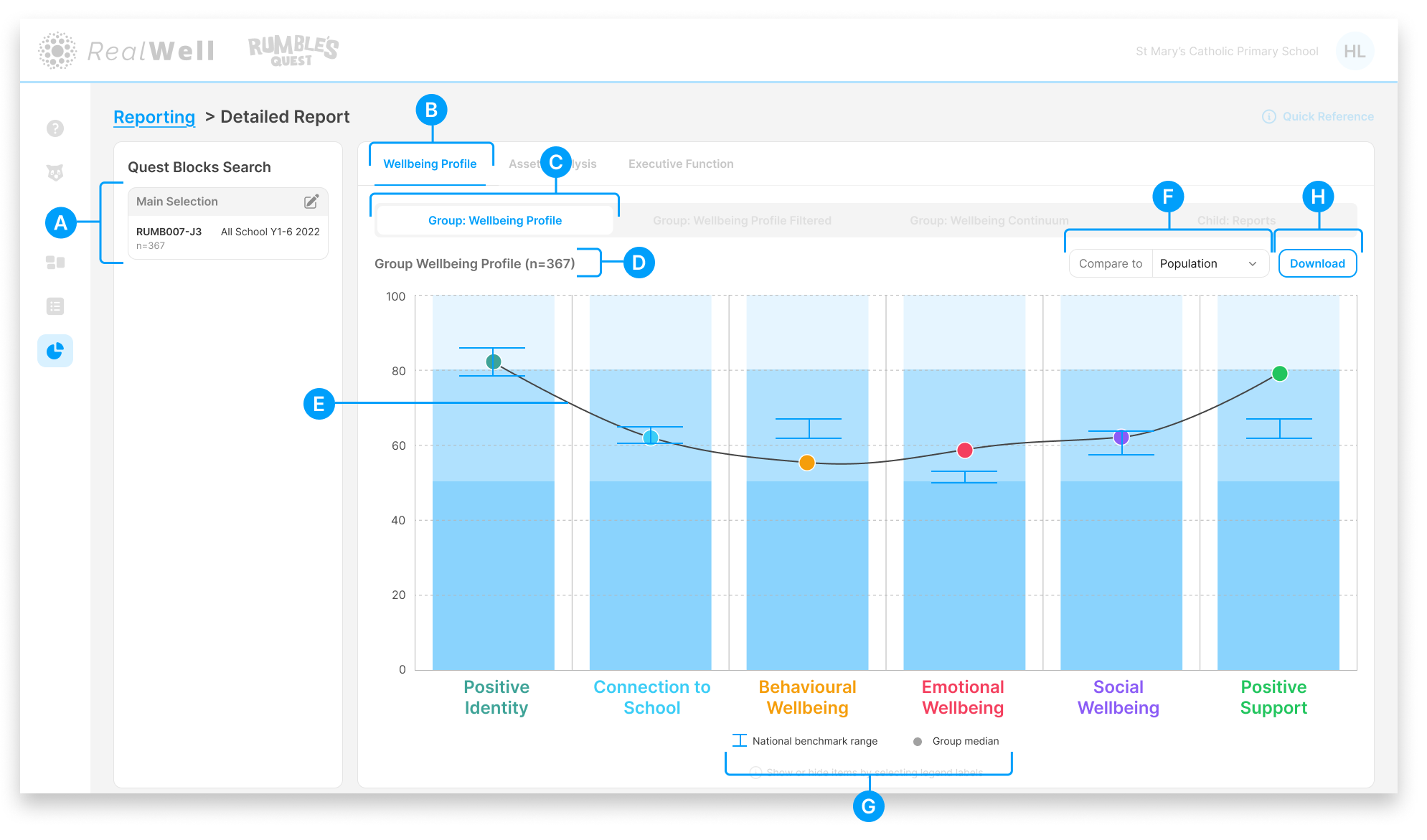
(A) Quest Blocks Search — The Quest Block(s) and sample size for this report. Your selection represents the data collection period you're reporting on.
(B) Wellbeing Profile tab — The active reporting group
(C) Group: Wellbeing Profile report tab — The active report
(D) Sample size — The number of children included, e.g. "Child Reports (n=367)"
(E) Group Wellbeing Profile — The chart displaying your group's wellbeing data, with median scores plotted across all six domains
(F) Compare to — Overlay benchmark data onto the chart. Options include Population (all organisations) and Like Schools (school organisations only).
(G) Legend — Shows what the chart elements represent (Group median, Population median/zone). Hover over a legend key to highlight its corresponding line on the chart.
(H) Download — Download the chart and associated scores as a PDF
Reading the Chart
Each domain is represented by a column with a coloured dot marking your group's median score. The column's blue shading indicates the wellbeing ranges (Struggling, Coping, and Strong), so you can see at a glance where your group's median sits relative to those bands.
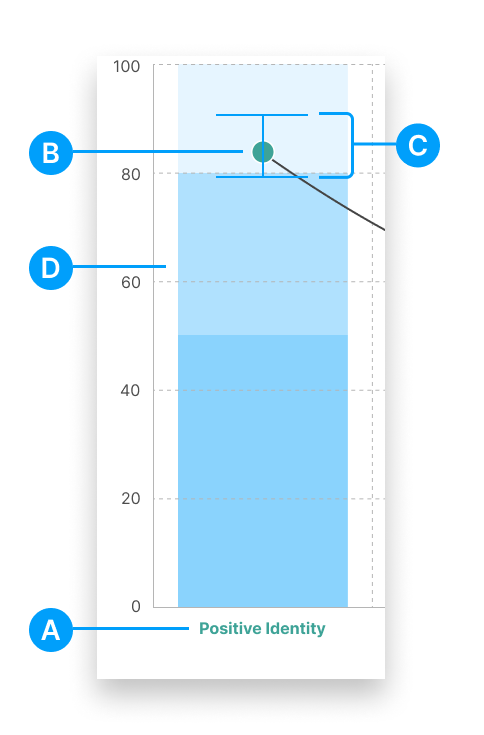
(A) Domain label — The wellbeing domain name, colour-coded for easy reference
(B) Group median — The coloured dot shows where the middle score of your group sits on the 0–100 scale
(C) Population benchmark — When Compare to is active, a box-whisker plot shows the population median and range for comparison
(D) Wellbeing range bands — The shaded bands represent the Struggling, Coping, and Strong ranges for each domain
Comparing Your Data
Use the Compare to dropdown to overlay comparison data onto the chart. Only one comparison can be active at a time. The available options depend on your organisation type:
Population — Compare your group's results against the broader Rumble's Quest population norms
Like Schools — Compare against schools with a similar profile (available to school organisations only)
Other Time Period — Compare your current results against a different data collection period
When Population or Like Schools is selected, a box-whisker plot appears on each domain. The line marks the population median, and the whiskers show the confidence range around that estimate.
Comparing Against Another Time Period
Selecting Other Time Period opens the Quest Block selection panel, the same one used when setting up your report. Search or filter to find the Quest Block(s) you want to compare against, then click Continue. If the same child appears in both selections, the system will flag duplicates and let you choose how to handle the overlap, just as it does for the main selection.
Once applied, the comparison data appears as a second line on the chart.
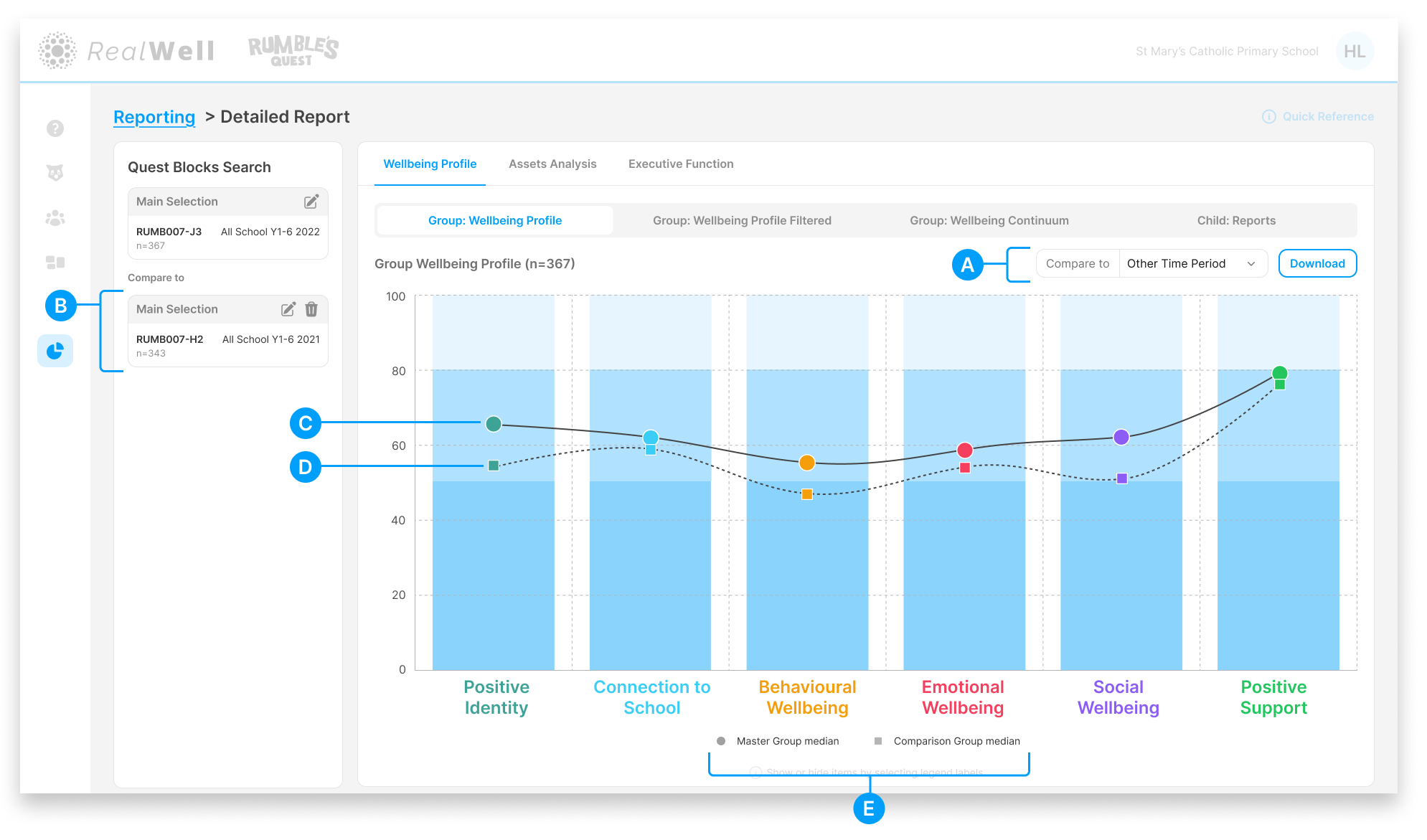
(A) Compare to — The dropdown with Other Time Period selected
(B) Compare to panel — The comparison Quest Block(s) appears in the Quest Blocks Search sidebar beneath your main selection, with edit and delete icons to modify or remove it
(C) Master Group median — The solid line with coloured dots, representing your main selection
(D) Comparison Group median — The dashed line with square markers, representing the comparison period
(E) Legend — Shows both the Master Group median and Comparison Group median. Click a legend item to toggle its line on and off.
This view is useful for tracking changes over time, for example comparing this year's results against last year's to see where wellbeing scores have shifted across the six domains.