
Filter Children
Click to view full screen…

As your school or organisation uses Rumble's Quest over time, your children list will grow. The filter system is a powerful tool for managing this, letting you focus on exactly the children you need, whether that's a current cohort, a specific grade, or children associated with a particular Quest Block.
The Children table is sorted by Last Modified date by default, so your most recently added or updated records appear first. Filters let you go further, narrowing the list across a range of properties.
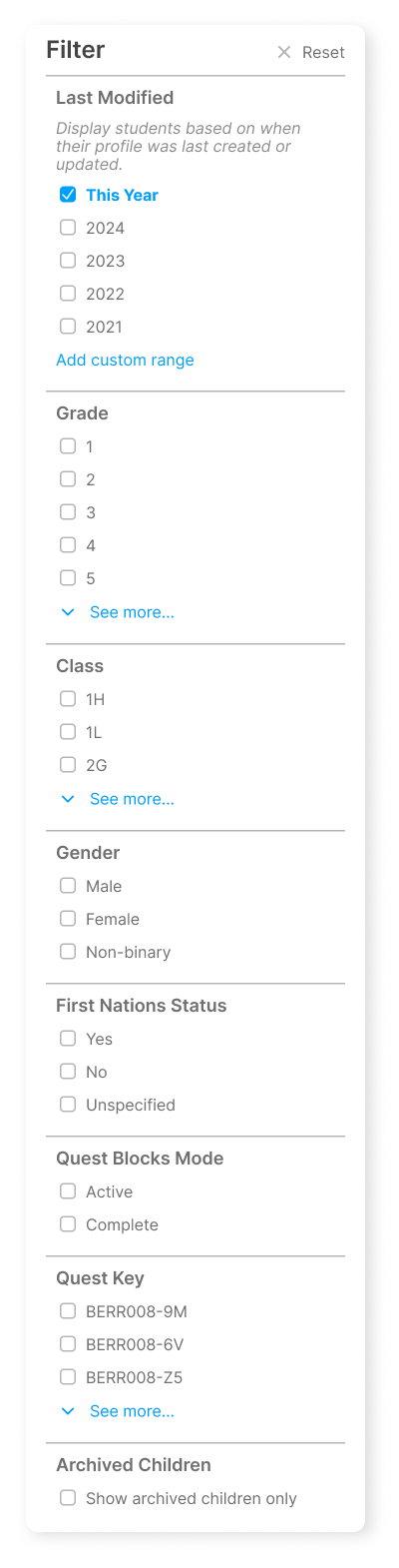
Filter Options
Last Modified Filter children based on selected years or a custom date range. Useful for focusing on recently added or updated records.
Grade Filter by grade level.
Class/Group Filter by class or group.
Gender Male, Female, Non-binary.
First Nations Status Yes, No, Unspecified.
Quest Blocks Mode Filter by Active or Complete Quest Blocks. Useful for focusing on children involved in current data collection rounds
Quest Key Filter by a specific Quest Block to see which children are associated with it.
Archived Children Show only archived children. By default, archived children are hidden from the main list. Enable this filter to view and manage them. See Archive Children.
Using Filters
Click the Filter button
Select the criteria you want to filter by
The list updates automatically
Click Reset to clear all filters
Multiple filters can be applied at once to narrow down your view.